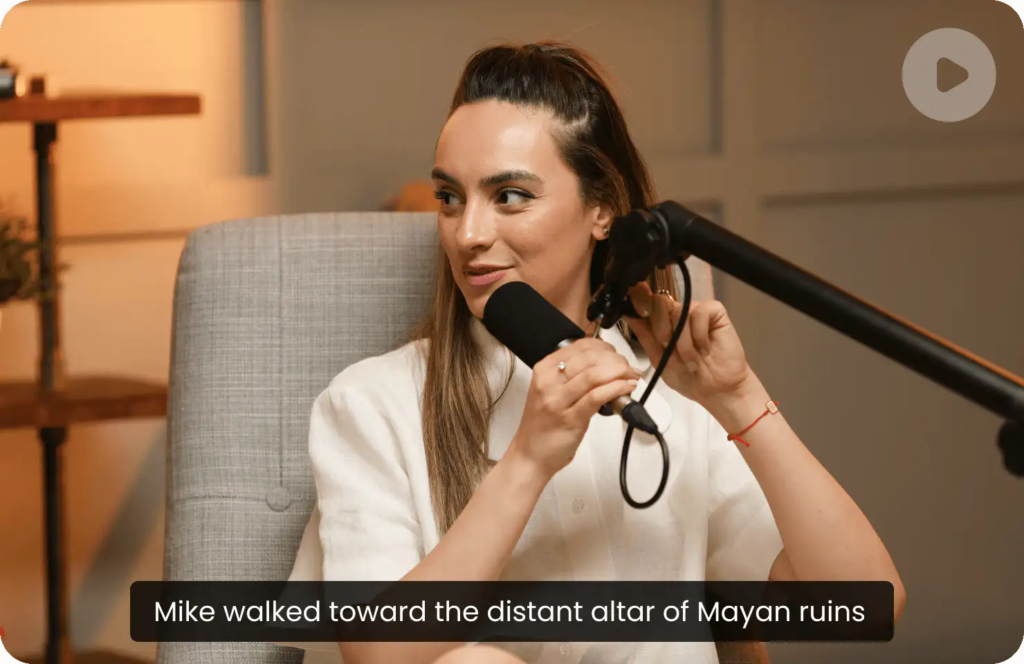


RecCloud Review is worth reading if you are looking for an AI-powered video platform that can handle more than just basic video editing. For YouTube creators, RecCloud combines AI video generation, speech-to-text, subtitles, text-to-speech, video translation, video summarization, clip creation, and traditional online video editing in one cloud-based platform.
Creating YouTube content often means switching between several different tools. You might use one application to write or generate a voiceover, another to create subtitles, another to translate your video, and a traditional editor to finish everything.
RecCloud takes a different approach by bringing many of these AI video tools together. But is it actually the best AI video tool for YouTube creators? In this RecCloud review, we’ll look at its main features, advantages, potential limitations, pricing, and who should consider using it.
What Is RecCloud?
RecCloud is an online AI media platform designed to simplify video and audio production. Its current collection of tools includes AI Speech to Text, AI Video Translator, AI Subtitle Generator, AI Text to Speech, AI Video Generator, AI Video/Audio Summarizer, AI Video Clip Maker, and other video editing tools.
Instead of installing multiple desktop applications, creators can access these tools through a cloud-based workflow.
This makes RecCloud particularly interesting for YouTubers, social media creators, educators, marketers, and anyone who regularly needs to process video content.
RecCloud Review
So, what is RecCloud actually like from a YouTube creator’s perspective?
The biggest advantage is its breadth of features. RecCloud isn’t focused on just one AI function. It attempts to cover several stages of the video production process, from turning speech into text to generating videos and creating subtitles.
For a creator who regularly publishes content, having these tools in one place can potentially reduce the amount of time spent moving files between different services.
Let’s take a closer look at the features that matter most for YouTube creators.
1. AI Speech to Text
One of the most useful features is AI Speech to Text.
You can use it to convert spoken audio from videos or recordings into text. RecCloud says its speech-to-text tools support more than 100 languages and can handle files up to 4GB and five hours in duration on supported workflows.
This can be useful for:
- YouTube video transcripts
- Interviews
- Podcasts
- Tutorials
- Product reviews
- Online courses
- Meeting recordings
- Content research
Once your video has been converted into text, that transcript can also become the starting point for subtitles, translations, summaries, and additional content.
For YouTube creators, this can be especially useful because a transcript can be repurposed into blog posts, social media captions, Shorts ideas, and other content.
2. AI Subtitle Generator
Creating subtitles manually can be extremely time-consuming.
RecCloud provides AI subtitle generation that can automatically recognize speech and generate editable subtitles. The platform also supports subtitle translation and SRT-related workflows.
For YouTube creators, subtitles can serve several purposes.
They can make videos more accessible, help viewers understand speech in noisy environments, and make your content easier to consume without sound.
You can also customize subtitle appearance in RecCloud’s AI-generated video workflow, including font, color, position, spacing, backgrounds, and preset styles.
3. AI Video Translation
If you want to build an international YouTube audience, video translation is one of RecCloud’s more interesting features.
RecCloud provides AI video translation with options involving translated subtitles and dubbed audio.
Imagine that you have already created a successful English YouTube video.
Instead of producing an entirely new video from scratch, you could potentially create localized versions by translating the spoken content, generating translated subtitles, and creating a new AI voiceover.
This can be useful for creators targeting audiences in languages such as Spanish, Chinese, Japanese, Arabic, and others.
For international content creators, this could turn one video into multiple localized versions.
4. AI Text to Speech and Voice Generation
Not every YouTube creator wants to record their own voice.
If you’re running a faceless YouTube channel, producing tutorials, or creating large amounts of content, AI voice generation can make the production process much easier.
RecCloud’s AI Text-to-Speech tools can convert written content into AI-generated speech, with multiple voice options and languages available.
You could write a script and then use an AI voice to create narration for:
- YouTube videos
- Shorts
- Product introductions
- Tutorials
- Educational videos
- Explainer videos
- Marketing videos
However, it’s still important to listen to the generated narration before publishing. Names, technical terms, numbers, and unusual words may occasionally require manual correction.
5. AI Text-to-Video
One of the most interesting RecCloud features is AI Text-to-Video.
Instead of starting with a blank editing timeline, you can provide a text description and let the AI create a storyboard and video structure.
RecCloud’s current text-to-video workflow allows users to enter an idea, review AI-generated scenes, modify individual shots, adjust subtitles and narration, and then generate the final video.
The platform supports different aspect ratios and resolutions, including formats suitable for YouTube and vertical social media content.
This can be particularly useful when you don’t have enough original footage.
For example, you could create an explainer video from a written script and then customize the scenes before exporting the final result.
6. AI YouTube Video Maker
RecCloud also offers a dedicated AI YouTube Video Maker.
The basic workflow is straightforward: enter your video idea, allow the AI to create a storyboard, review and modify the generated content, and then export the finished video.
The storyboard approach is particularly useful because it gives creators more control than simply generating one video from a single prompt.
You can review individual scenes, replace unwanted shots, edit text, and regenerate voiceovers before exporting the final video.
For beginners, this can make AI video creation considerably less intimidating.
7. AI Video and Audio Summarizer
Another useful feature is AI Video/Audio Summarization.
Suppose you have a one-hour interview or a long YouTube video. Instead of watching the entire video again just to identify the important sections, you can use AI to summarize the content and extract key information.
RecCloud also supports summarization workflows involving YouTube videos.
This could be useful for:
- Research
- Competitor analysis
- Podcast summaries
- Course content
- Interviews
- Long YouTube videos
- Content planning
For creators who spend a lot of time researching before writing scripts, this could potentially save significant time.
8. AI Video Clip Maker
Long-form content can often be reused as short-form content.
For example, imagine that you publish a 15-minute product review on YouTube.
Instead of creating Shorts completely from scratch, you can identify interesting sections from the long video and turn them into shorter clips.
RecCloud includes an AI Video Clip Maker as part of its AI toolset.
This fits particularly well with a modern YouTube content strategy:
One long video → multiple Shorts → social media posts → additional content.
For creators who publish frequently, content repurposing can be just as important as content creation.
9. Online Video Editing Tools
RecCloud isn’t only an AI platform.
It also includes traditional online video editing functions such as trimming, cropping, merging, compression, format conversion, GIF creation, and audio extraction.
These tools may sound simple, but they’re useful for quick editing jobs.
For example, if you only need to trim a video, convert an MP4 file, extract audio, or reduce the file size, you may not need to open a large professional video editing application.
10. Multiple Formats for YouTube and Social Media
Different platforms require different video formats.
YouTube typically works well with landscape videos, while Shorts, TikTok, and Instagram Reels generally use vertical formats.
RecCloud’s AI video generation workflow supports multiple aspect ratios, including 16:9, 9:16, and 1:1, along with different export resolutions.
This makes it easier to adapt the same content for different platforms.
For example:
YouTube Long Video: 16:9
YouTube Shorts: 9:16
Social Media Posts: 1:1 or other supported formats
That flexibility can be useful if you’re building a multi-platform content strategy.
Is RecCloud Good for Faceless YouTube Channels?
Yes, RecCloud can be particularly interesting for faceless YouTube creators.
A typical faceless workflow might look like this:
Topic → Script → AI Voiceover → AI Video → Subtitles → Editing → Export
RecCloud can cover several of these stages.
You can start with a written idea, generate a storyboard and video, select an AI voice, customize subtitles, and export the finished content.
That doesn’t mean every automatically generated video will be ready for publication without editing.
The best results will usually come from treating AI as an assistant rather than completely handing over the creative process.
Is RecCloud Good for YouTube Shorts?
RecCloud can also fit well into a Shorts workflow.
You can create vertical videos using AI video generation, add AI narration and subtitles, and repurpose existing long-form content with video clip tools.
For creators who publish both long-form videos and Shorts, this creates an opportunity to get more content from each production session.
Instead of thinking about one video as one piece of content, you can think about it as the source of multiple pieces of content.
RecCloud Pricing
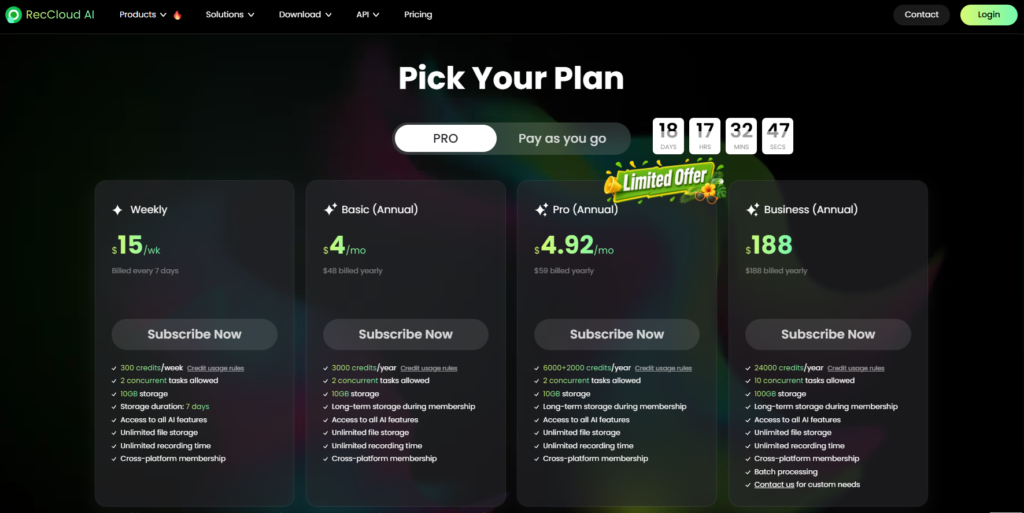
RecCloud currently offers several membership options, including Weekly, Basic, Pro, and Business plans.
At the time of writing, the official pricing page lists the Weekly plan at $15 per week, Basic at $4 per month when billed annually, Pro at $4.92 per month when billed annually, and Business at $188 per year. The plans have different credit allocations and usage limits.
For example, the current annual Basic plan lists 3,000 credits per year, while the Pro plan lists 6,000 credits per year. The Business plan lists 24,000 credits per year and supports more simultaneous tasks and larger storage.
However, RecCloud states that prices may change, so you should always check the official pricing page before purchasing.
Check RecCloud’s latest pricing
RecCloud Pros and Cons
PROS
- All-in-one AI video workflow: RecCloud combines numerous AI video and audio functions in one platform.
- Useful for YouTube creators: Video generation, subtitles, voiceovers, translation, summarization, and clip creation all have obvious applications for YouTube.
- Good for faceless content: AI voice and AI video generation can help creators produce content without recording themselves.
- Multilingual support: Video translation, subtitles, and AI voice tools can help creators reach international audiences.
- Cloud-based workflow: Projects can be managed online, making it easier to continue working across devices.
- Traditional editing tools included: You can perform basic editing tasks without switching to another application.
CONS
- AI output still requires review: Automatically generated videos, subtitles, translations, and voiceovers should be checked before publication.
- Credit-based usage: Some AI features consume credits, so frequent users need to pay attention to usage limits.
- Not necessarily a replacement for professional editing software: Professional creators may still want advanced timeline editing, color grading, motion graphics, and other specialized capabilities.
- Pricing can change: RecCloud explicitly notes that prices may change, so current pricing should be checked before subscribing.
Who Should Use RecCloud?
RecCloud may be a good choice if you are:
- A YouTube creator
- A YouTube Shorts creator
- Running a faceless YouTube channel
- Creating product review videos
- Producing tutorials
- Making educational content
- Creating multilingual videos
- Repurposing long videos into Shorts
- Looking for AI voiceover tools
- Looking for AI subtitle tools
- Looking for an online video editor
On the other hand, if you already use a professional editing workflow and only need advanced manual video editing, RecCloud may not replace your existing editor.
Its biggest advantage is not necessarily being the most advanced tool in every individual category.
Instead, its strength is bringing many different AI video functions together in one platform.
How YouTubers Could Use RecCloud
A practical YouTube workflow could look like this:
Step 1: Write Your Script
Start with your video idea and create a structured script.
Step 2: Generate the Voiceover
Use AI Text-to-Speech if you don’t want to record your own narration.
Step 3: Create the Video
Use AI video generation or upload your own footage.
Step 4: Add Subtitles
Generate and customize subtitles automatically.
Step 5: Translate the Video
Create additional language versions if you want to reach international audiences.
Step 6: Create Shorts
Extract interesting sections from your long-form video and repurpose them into short-form content.
Step 7: Export
Choose an appropriate aspect ratio and resolution for YouTube or other social media platforms.
This workflow can significantly reduce the number of different tools required for basic AI-assisted video production.
Try RecCloud
If you want to explore RecCloud yourself, you can check out the platform here:
👉 Try RecCloud: Get Started with RecCloud
Whether you’re making YouTube videos, Shorts, product reviews, tutorials, or faceless content, it’s worth testing the features yourself and seeing whether they fit your workflow.
Conclusion
So, is RecCloud the best AI video tool for YouTube creators?
There isn’t a single AI video platform that will be the best choice for everyone.
However, RecCloud has one major advantage: it combines a large number of AI video and audio functions into one platform.
From AI Speech to Text and AI subtitles to AI voice generation, video translation, AI video generation, video summarization, and clip creation, RecCloud covers many of the repetitive tasks that YouTube creators deal with every day.
For beginners, it can provide an easier way to experiment with AI video production.
For experienced creators, it can potentially speed up repetitive tasks such as transcription, subtitle generation, translation, voiceover creation, and content repurposing.
And for faceless YouTube creators or creators targeting multiple languages, RecCloud may be particularly useful.
The important thing is to use AI as a creative assistant, not as a complete replacement for human creativity. Review the generated content, correct mistakes, improve the storytelling, and add your own ideas.
If you’re looking for an all-in-one AI video tool for YouTube, RecCloud is definitely worth trying and comparing with the tools you already use.